Malibu: A Fresh Script Font for Handmade Brands
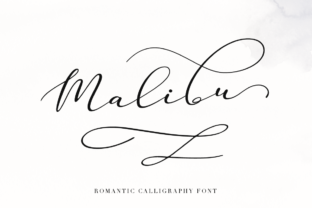
The morning light hits my workbench just right as I open my design software, ready to tackle the next batch of soy candle labels. For weeks, I had been struggling to find the perfect balance between modern minimalism and that warm, personal touch that makes a handmade item feel special. Then I stumbled upon Malibu, a fresh handmade calligraphy script font from Script Amp, and suddenly, the vision for my shop’s new summer collection clicked into place. It wasn’t just about choosing a typeface; it was about finding a voice for my brand.
As crafters and small business owners, we know that our products are only half the story. The other half is how they are presented. Whether you are designing greeting cards, wedding invitations, or printable wall art, the typography you choose sets the emotional tone before the customer even touches the physical item. Malibu brings a breezy, relaxed elegance that feels both professional and deeply human. It captures the essence of coastal calm and creative freedom, making it an ideal choice for makers who want their branding to feel approachable yet polished.
Bringing Personality to Product Labels
One of the most immediate applications for Malibu is in product labeling. I recently used it for a line of artisanal soap bars, pairing the flowing script with a clean, geometric sans serif font for the ingredient list. The contrast was striking. The script handled the product name with grace, adding a decorative flourish that caught the eye, while the secondary font ensured readability for essential information. This combination is crucial for maintaining brand consistency across different mediums, from boutique tags on clothing to stickers on jam jars.
When working with cutting machines like Cricut or Silhouette, script fonts can sometimes be tricky due to connected letters. However, Malibu is designed with clarity in mind. While it retains the organic flow of hand-lettering, the strokes are distinct enough to cut cleanly without excessive weeding. For smaller stickers or intricate label designs, I always recommend testing a small batch first. Adjusting the size slightly larger than you think you need can prevent the delicate tails and swashes from getting lost, ensuring your packaging looks crisp and high-quality.
Elevating Stationery and Wedding Designs
Beyond physical goods, Malibu shines in the world of stationery and event design. Wedding invitations demand a typeface that feels celebratory and romantic without being overly formal or stiff. I used Malibu for a set of digital invitation templates, focusing on the couple’s names and key dates. The font’s natural rhythm mimics the movement of a real brush pen, giving each letterform a unique character. This adds a layer of perceived quality and care that resonates with couples looking for something personal.
For printable creators, this font opens up numerous possibilities. Imagine designing planner pages where headers are written in Malibu, adding a touch of whimsy to daily organization. Or consider creating printable wall art featuring inspirational quotes. The legibility of Malibu allows it to work well for short phrases and titles, making it perfect for display use. When paired with a simple serif font for the body text, the design feels balanced and editorial, suitable for framing in a modern home office or bedroom.
Versatility Across Merchandise and Digital Assets
The versatility of Malibu extends far beyond paper products. I have experimented with applying the font to tote bags and mugs using heat transfer vinyl and sublimation printing. Because it is a display font, it works best for short, impactful words rather than long paragraphs. A single word like "Breathe" or "Create" in Malibu on a canvas tote bag creates a strong visual statement. It transforms a simple accessory into a piece of wearable art, enhancing the emotional appeal for the buyer.
In the realm of digital downloads and social media graphics, Malibu helps maintain a cohesive brand identity. Using the same font for Instagram story highlights, Pinterest pins, and email headers creates a recognizable visual language. Customers begin to associate that specific style of lettering with your shop, fostering brand recognition and loyalty. It is not just about aesthetics; it is about building trust through consistent, professional presentation.
Practical Tips for Makers and Designers
To get the most out of Malibu, consider the following practical advice when integrating it into your workflow:
- Check Included Styles: Before starting your design, explore the full character set. Look for alternates, ligatures, and swashes that can add uniqueness to specific letters, preventing repetitive patterns in longer words.
- Font Pairing: Malibu pairs beautifully with clean sans serif fonts for a modern look or simple serif fonts for a more traditional, elegant feel. Avoid pairing it with other complex scripts, as this can create visual clutter.
- Readability Testing: Always print a test sheet at actual size. What looks good on a screen may appear too thin or crowded when printed on textured paper or fabric. Ensure that critical information remains legible.
- Licensing Compliance: If you are selling physical products, templates, or digital downloads, verify the commercial font licensing terms. Ensure your usage aligns with the license provided by Script Amp to protect your business and respect the creator’s rights.
- File Formats: Utilize the appropriate file formats for your project. OTF or TTF files are standard for design software, while SVG files may be needed for certain cutting machine workflows. Check what is included in your download package.
Ultimately, choosing the right font is an act of storytelling. Malibu tells a story of freshness, creativity, and handcrafted care. It invites the viewer to slow down and appreciate the details, much like the handmade products it adorns. Whether you are designing seasonal craft items, holiday tags, or a complete brand identity overhaul, this typeface offers the flexibility and charm needed to make your work stand out. By thoughtfully integrating Malibu into your design assets, you elevate not just the look of your products, but the entire experience of your brand.